

Redefining “Installed”: From Connected to Ready to Operate
Overview
Videri’s original mobile app handled one critical job: getting devices online.
But the way our customers installed hardware had changed. Deployments increasingly relied on third-party installers, our hardware portfolio had expanded, and getting a device connected to the cloud was only one step toward making it operational.
As part of a complete redesign of the mobile app, I rethought provisioning around the reality of field deployment—expanding it from a basic connection flow into a guided setup experience that could take an installer from unboxing a device through a verified, ready-to-operate installation.
What I owned
I redesigned provisioning end to end, expanding it beyond connectivity to include batch setup, post-provisioning configuration, device identification, and installer permissions. This work was part of the larger mobile product vision I pitched and led alongside one Engineering Tech Lead. Using an AI-enabled build process, we took a project originally scoped as a 6–9 month external engagement and designed and delivered it internally in six weeks.
Role + Scope
Lead Product Designer → Product strategy, mobile UX/UI, interaction design, provisioning, batch workflows, roles & permissions, documentation
The app stopped before the job did
The original flow was intentionally simple. A user selected a device, chose how it would connect, gave it a name, and provisioned it.
Then the mobile experience ended.
Someone still had to open the web platform to finish setting up the device: upload an installation photo, apply metadata, schedule content, configure brightness or maintenance schedules, and complete other operational settings.
That handoff became especially problematic because the person installing the hardware often wasn't the person managing the Videri account.
Customers were regularly sending third-party installers into the field. Those installers could get a device online, but the product gave them neither the tools nor the appropriate access to finish the job.
The problem wasn't simply provisioning. Our definition of “done” was too narrow.

Falling short: The original workflow ended at connectivity, leaving the rest of setup to a second user in the web platform.
Designing for the reality of field deployment
The redesigned provisioning flow also needed to support a much broader hardware ecosystem.
I designed one framework that could accommodate:
Videri and third-party Videri Embedded devices
Wi-Fi, cellular, and Ethernet connections
Single-device and batch provisioning
Geotagging
Shared settings across batches
Clearer failure states and recovery guidance
I also added upfront guidance explaining what installers needed before beginning the process for each device type. Previously, customers often had to communicate these requirements themselves.
The goal wasn't to add more complexity to the flow. It was to absorb that complexity into the product so installers didn't have to.

Redefining what “finished” means
The biggest change came after the device connected successfully.
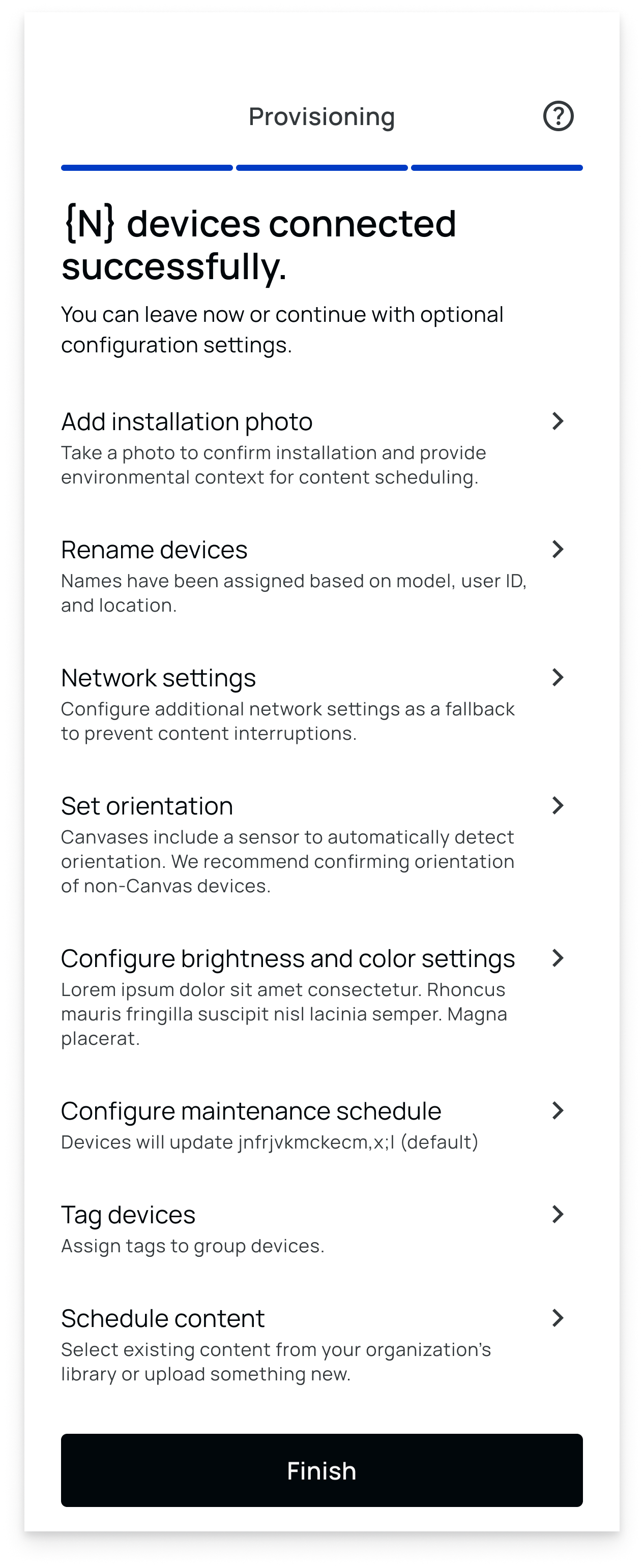
I introduced an optional post-provisioning checklist that asked a simple question: “Do you want to make any changes before leaving this session?”
From there, installers could complete the setup tasks that previously required someone to return to the web platform—adding tags, uploading an installation photo, configuring schedules, preparing content, and making other exposed device changes.
Customers could decide which actions their installers were expected to complete. As each action was performed, it was marked complete in the session.
This shifted provisioning from a technical endpoint into a full field setup workflow.
→ Getting online was no longer the finish line. Being ready for operation was.
Making batch setup work in the physical world
Extending configuration into the field created another problem: batch deployments.
An installer might provision several identical screens, then need to apply a setting to only some of them. Serial numbers worked technically, but forcing someone standing in front of multiple displays to continually match physical devices to long identifiers created unnecessary friction.
So I designed an identification mode.
When installers chose to configure only part of a batch, the displays temporarily showed simple single-digit numbers. The installer could identify the screens visually and select the corresponding numbers in the app instead of comparing serial numbers.
A small interaction made batch configuration much more practical in the environment where it actually happened.
Giving installers enough access
—but no more
Expanding what installers could do created a second design problem.
Customers needed external installers to configure devices, but that didn't mean they wanted to give those installers access to their entire organization.
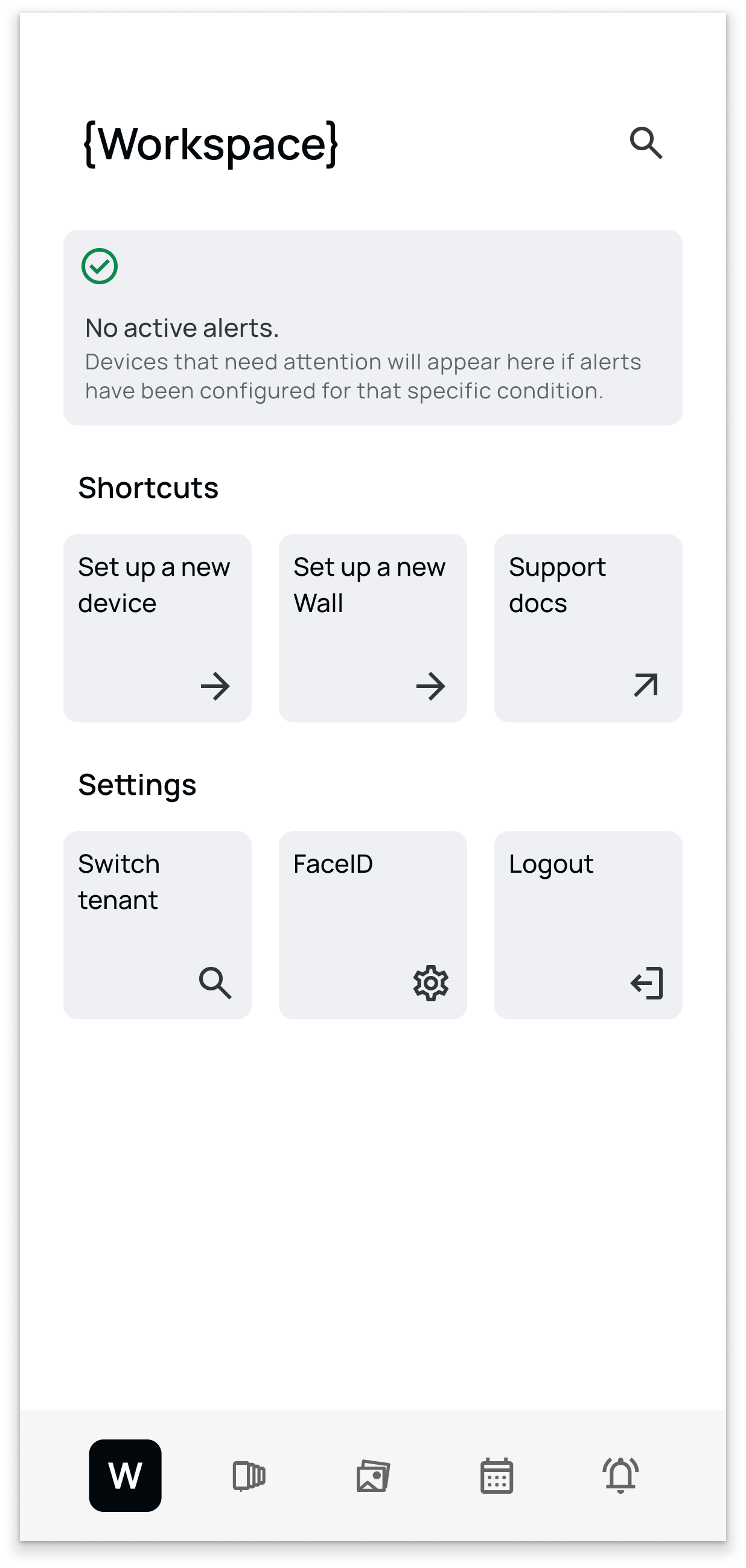
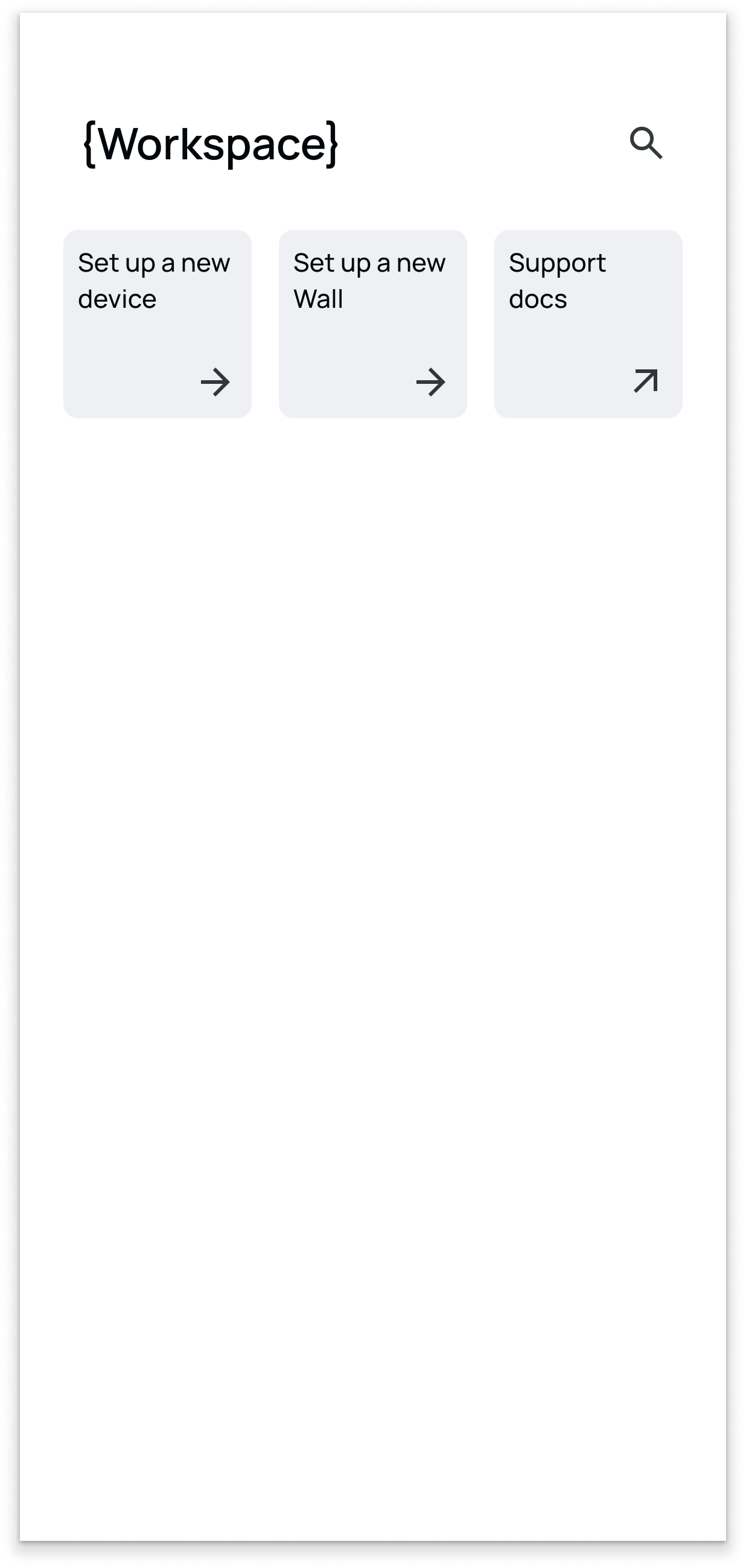
I designed the mobile experience to work with a new roles-and-permissions model. A dedicated “Installer” role could expose provisioning and the necessary setup actions while hiding everything else.
The app itself adapted to those permissions.
A third-party installer might log in and see little more than a Home shortcut to set up a new device. An internal technician could also receive access to device-management tools. An administrator could see the full experience.
Installers retained access to make corrections throughout the setup session. Once they tapped “Finish”, their ability to modify those newly provisioned devices ended.
The result was delegation without unnecessary exposure.
User with full access
User with installer permissions only
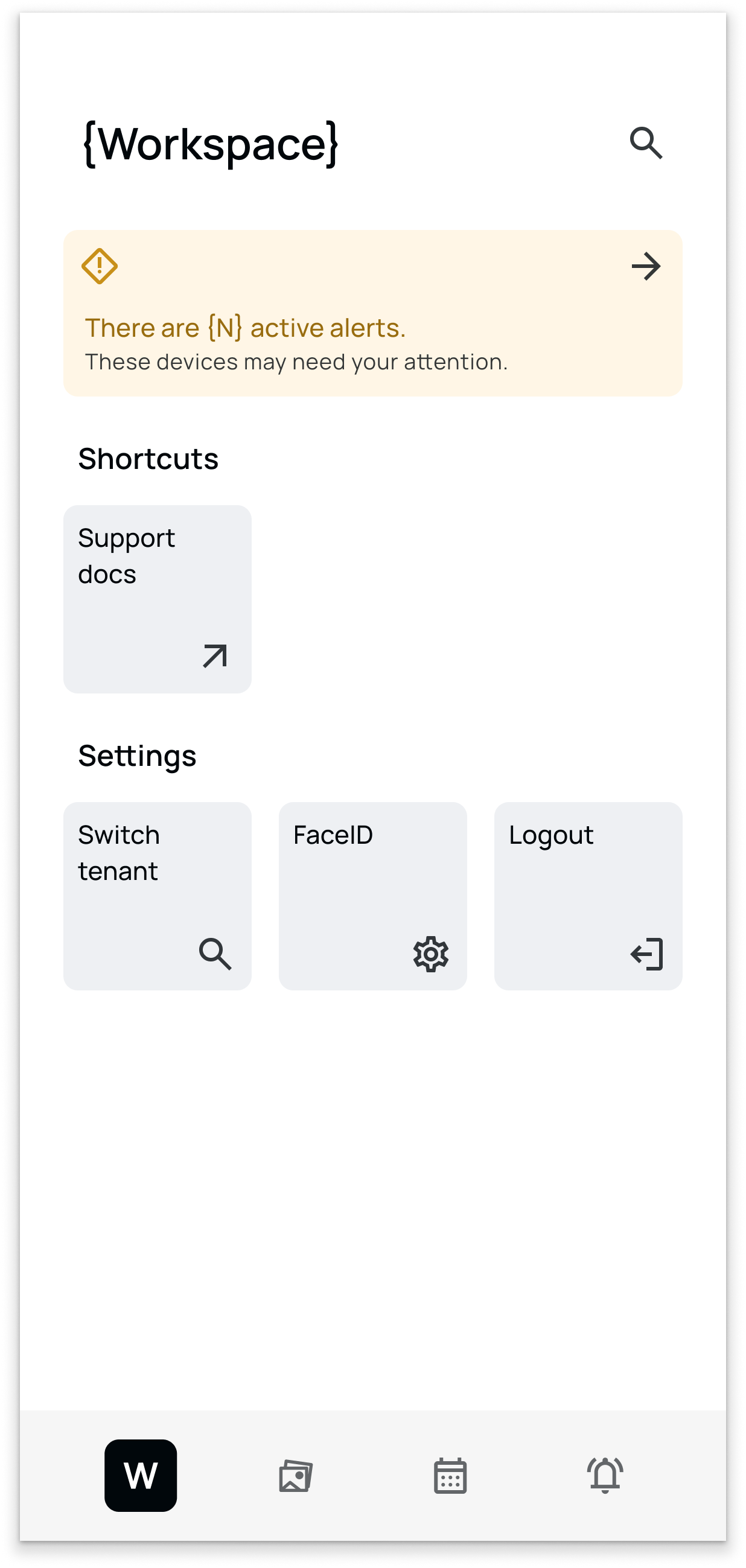
User without device management permissions
Turning field work into something customers could verify
The redesigned workflow also made installation visible to the people who weren't on site.
Configuration completed in mobile appeared immediately in the web platform. If an installer added metadata or changed a setting, a remote user could verify it from the device profile.
The most tangible example was the installation photo.
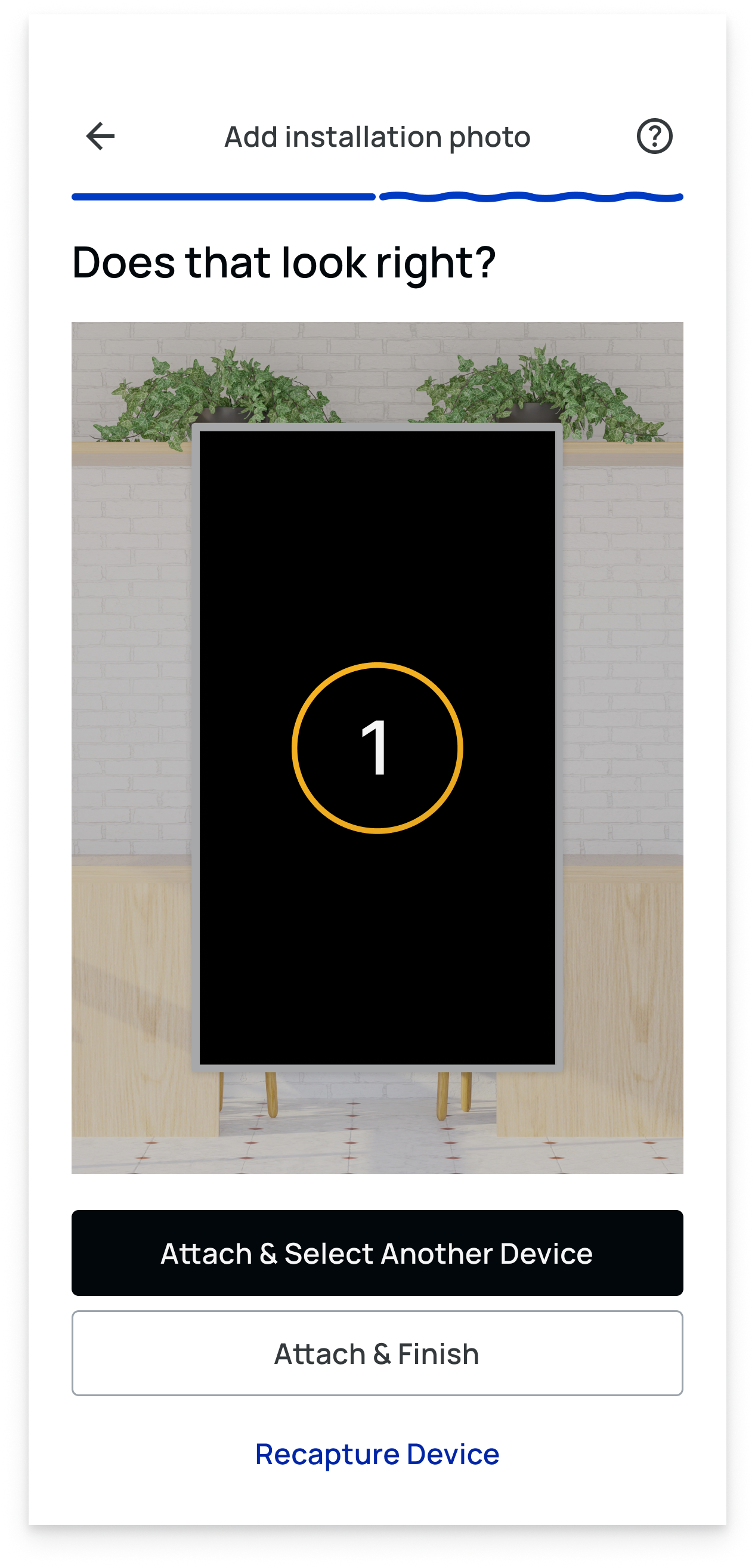
An installer could photograph the installed device before finishing the job, upload it through the checklist, and that image would immediately appear in the device's web profile.
For customers coordinating distributed installations, that created something the original workflow couldn't provide: proof that the physical work had actually been completed.
From handoff to ready-to-run
The redesign transformed provisioning from a narrow connectivity task into a controlled, end-to-end field deployment workflow.
Customers could delegate substantially more of the installation process while maintaining control over what installers could access. Installers received the guidance and tools they needed to finish the work on site. Remote teams gained visibility into configuration and physical installation without waiting for a second handoff.
More importantly, the solution connected several parts of the product that had previously been treated separately: provisioning, configuration, permissions, metadata, content, scheduling, and remote device management.
Instead of asking where mobile provisioning should end, I redesigned the workflow around where the installer’s job actually ended.