

One Device, Many Displays: Expanding a Platform Without Fragmenting It
Videri’s Portal3 had always been built around a simple assumption: one device mapped to one playback surface.
That model worked well for single-output commercial displays, where the device, screen, and playback experience were effectively the same thing. It gave users a straightforward way to understand device status, configure settings, and manage content.
But as Videri expanded support for dual-sided displays and SparkBridge devices with multiple output ports, that model no longer held. A single piece of hardware could now drive several displays, each with its own resolution, orientation, brightness schedule, tags, screenshots, and playback behavior.
The challenge was to support multiple independently managed outputs without introducing an entirely separate workflow for multi-output hardware. Portal3 needed to preserve the simplicity of the existing device-management experience while creating enough structure to represent the added complexity of multi-output systems.
What I owned
I led the device-management design for multi-output support, defining the relationship between devices and outputs, designing controls for managing them individually or together, and establishing consistent terminology across the product and supporting documentation.
Role + Scope
Sr. Product Designer → Device management, information architecture, interaction patterns, terminology, supporting documentation
Collaborators
Product Managers (hardware and software); Engineering Tech Leads; SVP of Product; SVP of Technology
The 1:1 model was breaking
In Portal3, information like resolution, orientation, screenshots, brightness, display settings, tags, and scheduling behavior had historically belonged to the device.
Multi-output hardware challenged that assumption.
A single SparkBridge could connect to displays with different resolutions and orientations. A dual-sided display could use different panels on each side. Proof-of-play now required multiple screenshots. And customers who licensed Independent mode needed to control each output separately.
At the same time, Mirrored mode still needed to behave like the simpler experience users already understood.
The challenge was not simply adding more settings. It was determining what the product now considered a device, what belonged to an output, and how those two levels should work together.
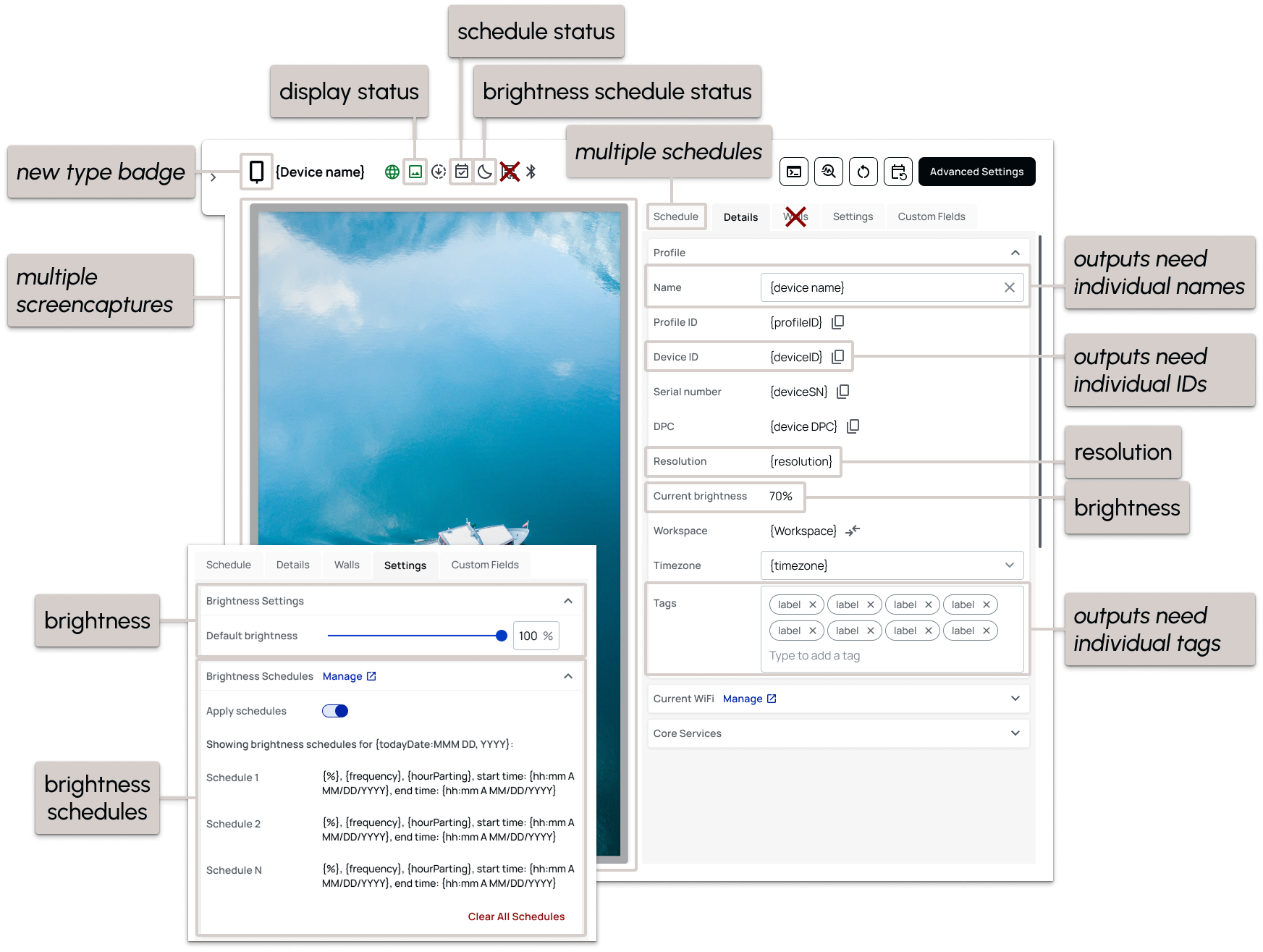
Audit of existing design: what needs to be considered for output-level settings and what changes multi-output device drawers require.
A simple rule for a more complex system
I used one principle to organize the experience:
If something affected the physical playback experience, it belonged to the output. If it affected the underlying hardware, it belonged to the device.
That distinction gave me a framework for evaluating each requirement instead of treating multi-output support as a collection of exceptions.
Resolution, orientation, display settings, brightness schedules, screenshots, and tags could belong to an individual output.
Hardware-level controls remained attached to the device itself.
There were technical exceptions, but the principle gave the product a consistent default—and became the basis for how I reorganized the device drawer, Advanced Settings, batch actions, and status information.
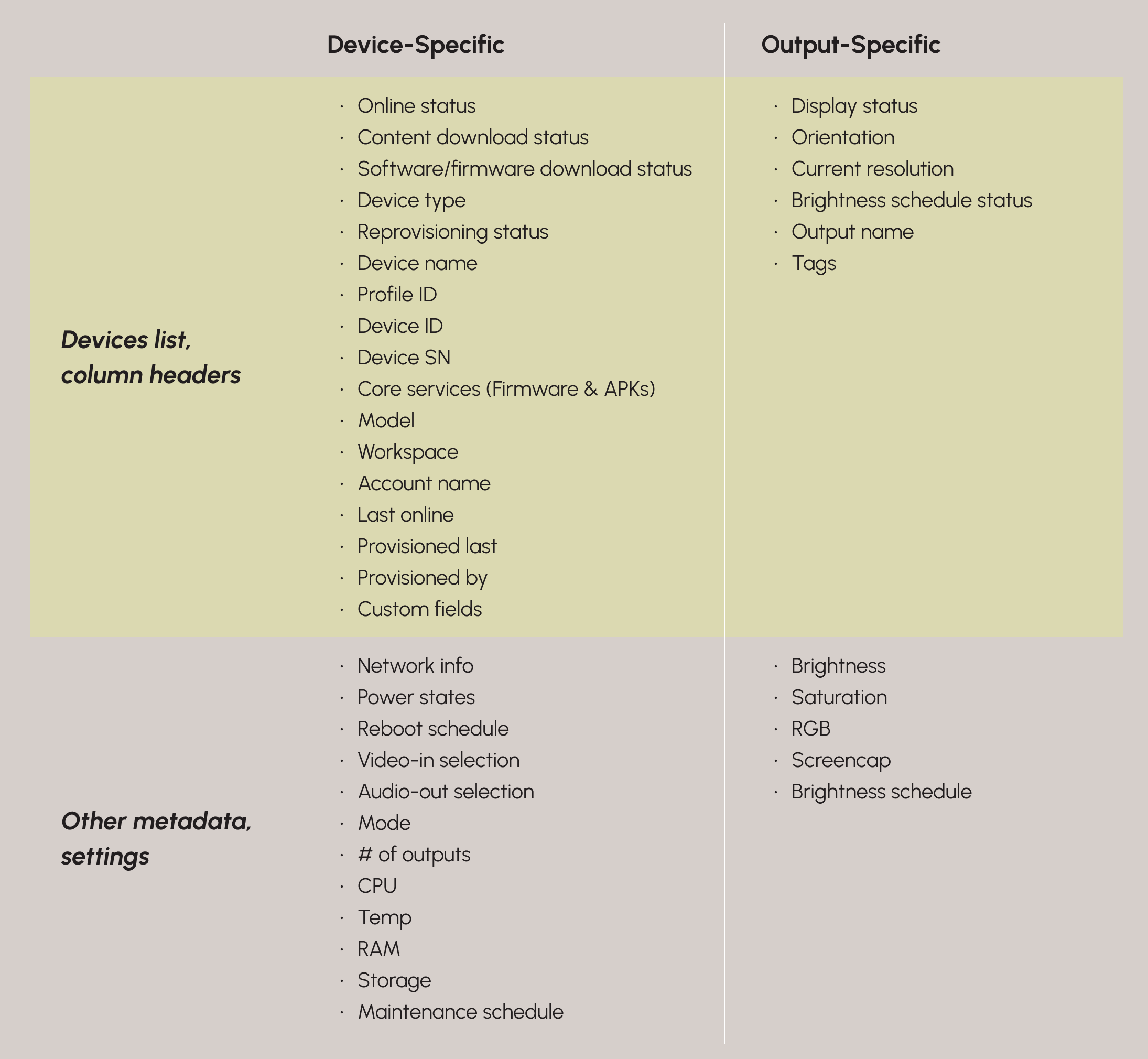
Inventory of device-level vs. output-level responsibilities.
One device, with detail when you need it
I wanted multi-output devices to remain recognizable within the existing Devices experience rather than introducing a separate management model.
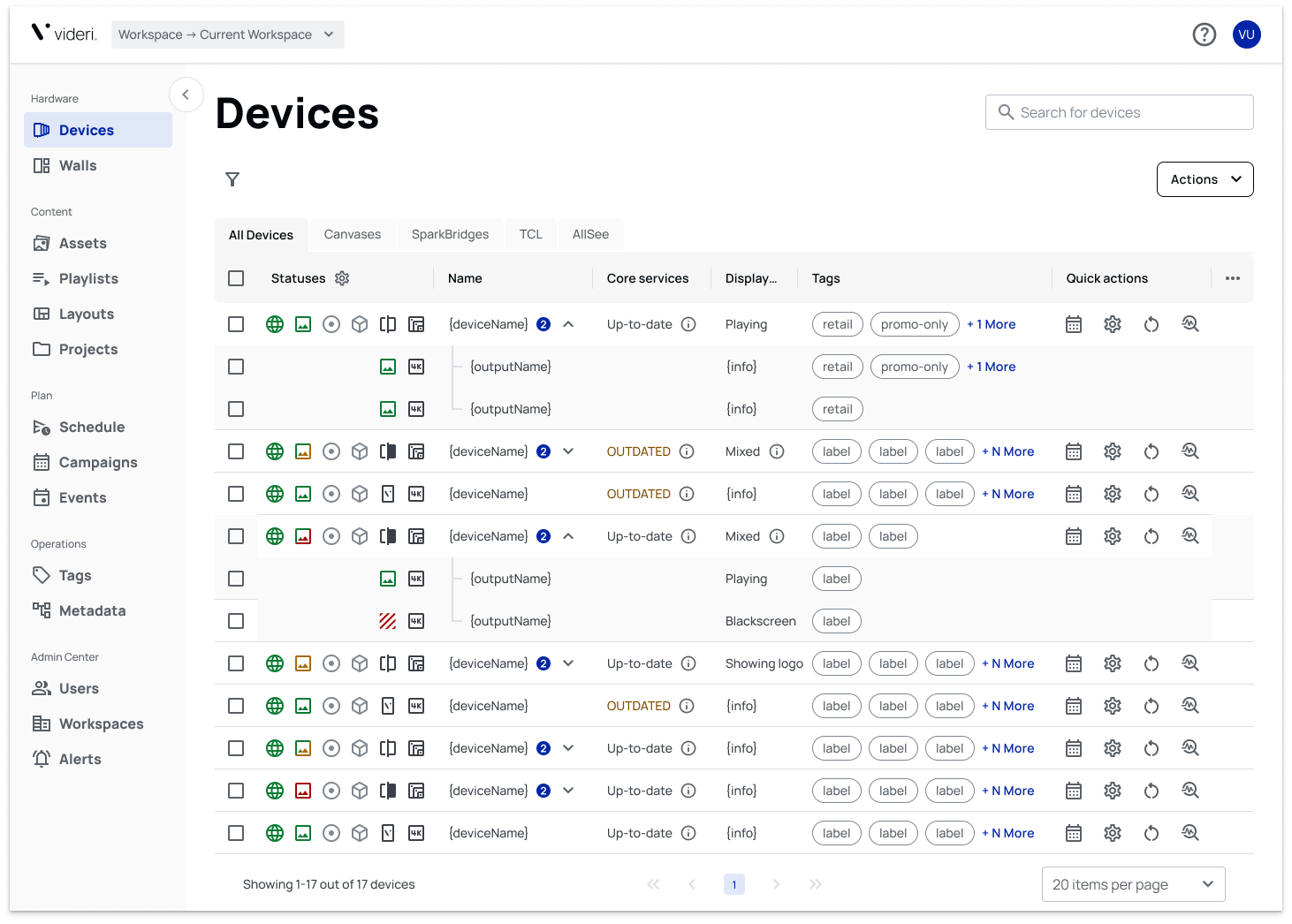
On the Devices page, the parent device appears like any other device, with a chip indicating its number of outputs. Users can expand the row to reveal each individual output.
For device metadata, I designed the parent row to summarize the system:
If every output shares the same value, that value appears normally.
If outputs differ, the parent displays “Mixed”, with additional detail available on hover.
Expanding the device reveals the exact status of each output.
Tags follow a slightly different pattern. The parent device displays the combined tags assigned across its outputs, while the expanded rows show which tags belong to each individual output.
This allowed the default list to stay compact while still supporting detailed inspection when needed.
Rethinking the drawer to make room for complexity
Proof-of-play created one of the more difficult interaction problems.
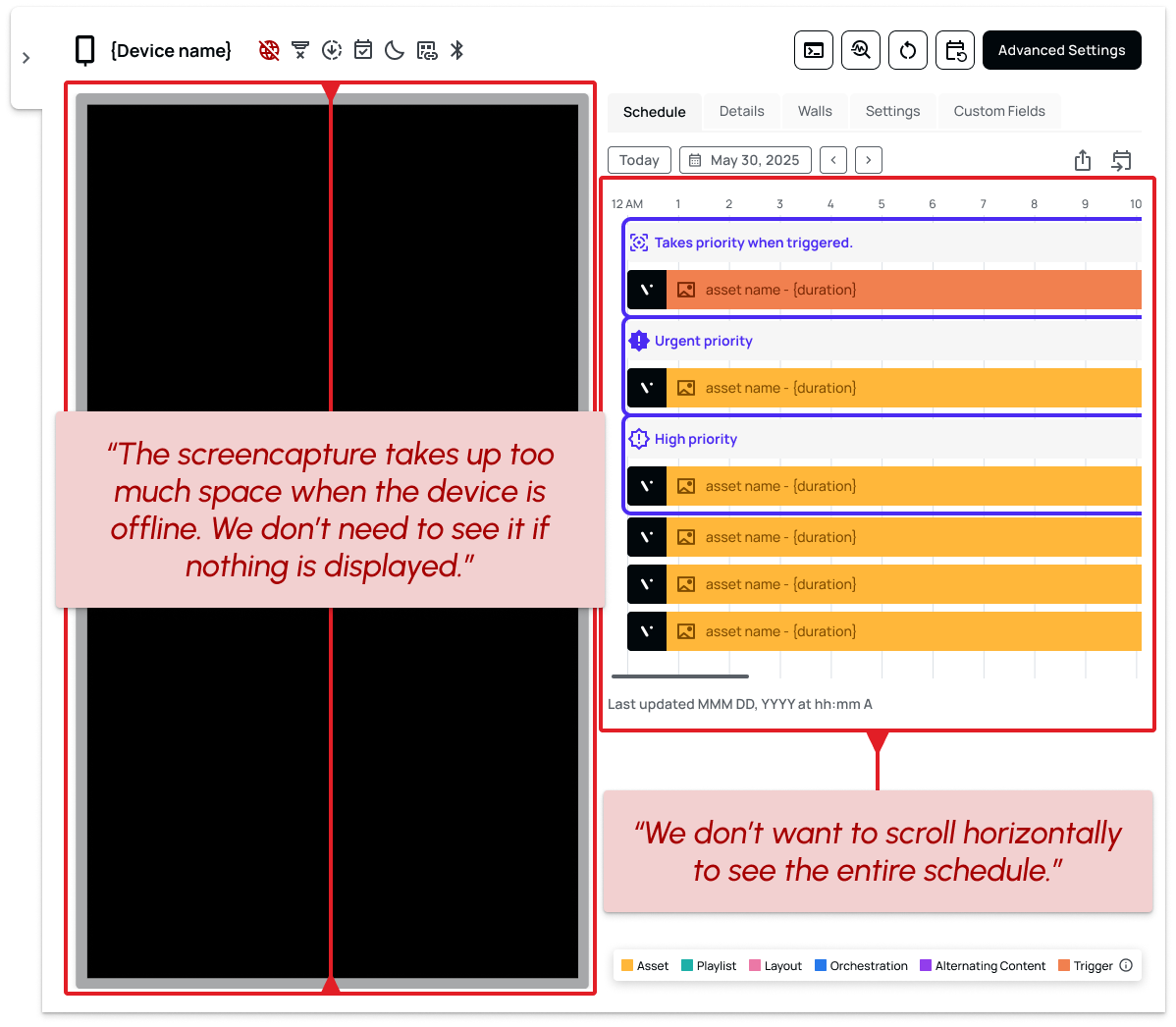
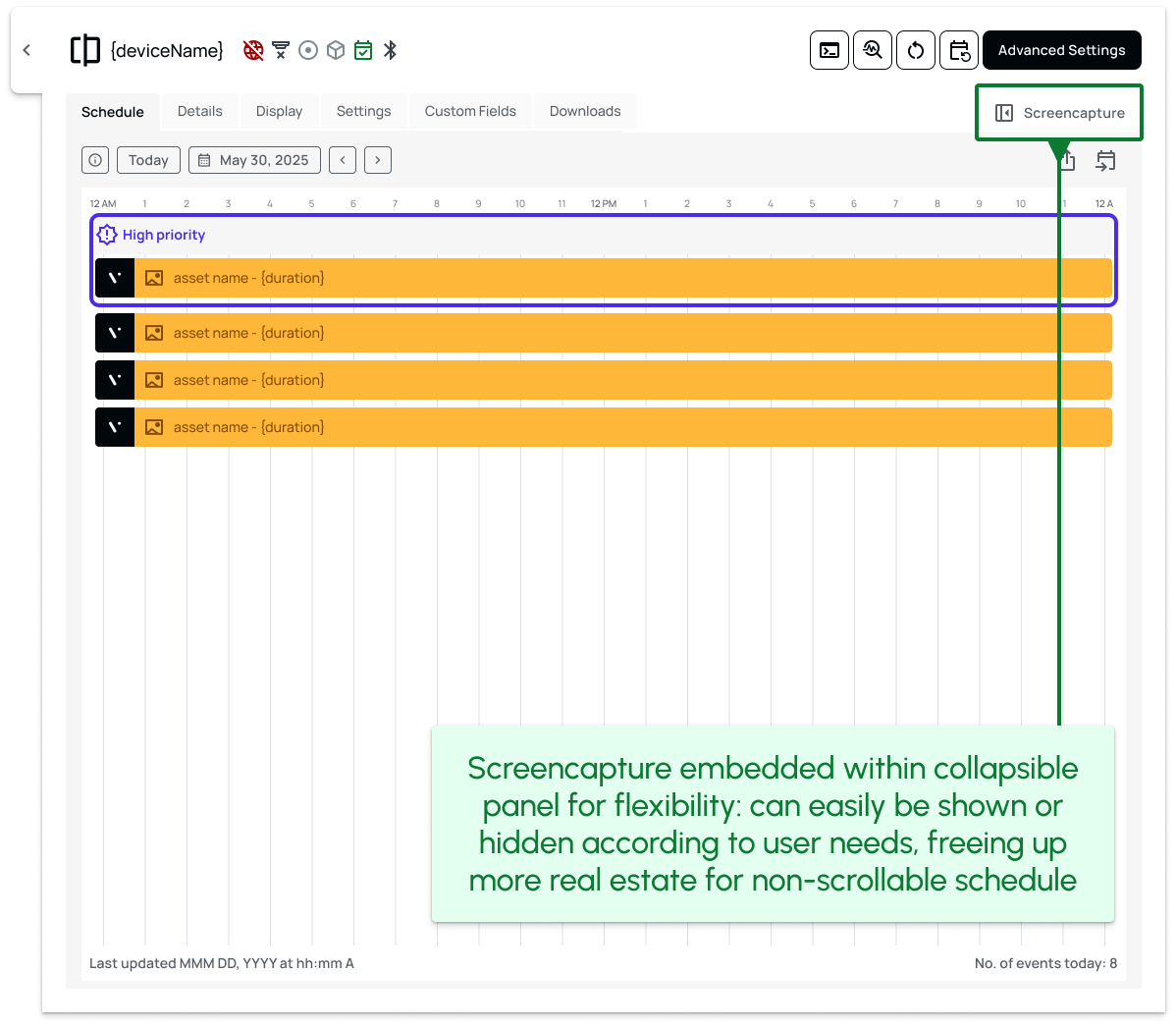
The original device drawer was designed around a single screencapture, displayed prominently alongside device information. Multi-output devices now needed a screencapture for every output, but Engineering could not support displaying multiple captures side-by-side.
At the same time, a major enterprise customer had raised a related concern: they wanted more room to inspect a 24-hour schedule view, while the recently redesigned drawer continued to reserve substantial space for a screencapture that provided little value when a device was offline. (If you haven’t yet, you can read about the drawer redesign initiative here.)
I moved the visual area to a dedicated panel on the right and made that panel collapsible. Users could keep proof-of-play visible when it was useful, or hide it to give schedule and device information more room. For multi-output devices, that same panel could now support tabs for each output’s screencapture.
What began as a new hardware requirement became another test of whether the drawer could scale with the product—and reinforced the value of redesigning the component as a flexible system rather than a fixed layout. One structural change solved several problems at once:
1
Multi-output proof-of-play: each output could have its own screencapture without crowding the interface.
2
More room for scheduling: collapsing the visual panel created space for deeper schedule inspection.
3
Less wasted space: users no longer had to reserve permanent screen real estate for an empty screencapture when a device was offline.
4
A more scalable component: the solution strengthened the drawer pattern itself instead of introducing another exception.
Making individual control practical
Supporting output-level settings created a second challenge: independence is only useful if managing it does not become tedious.
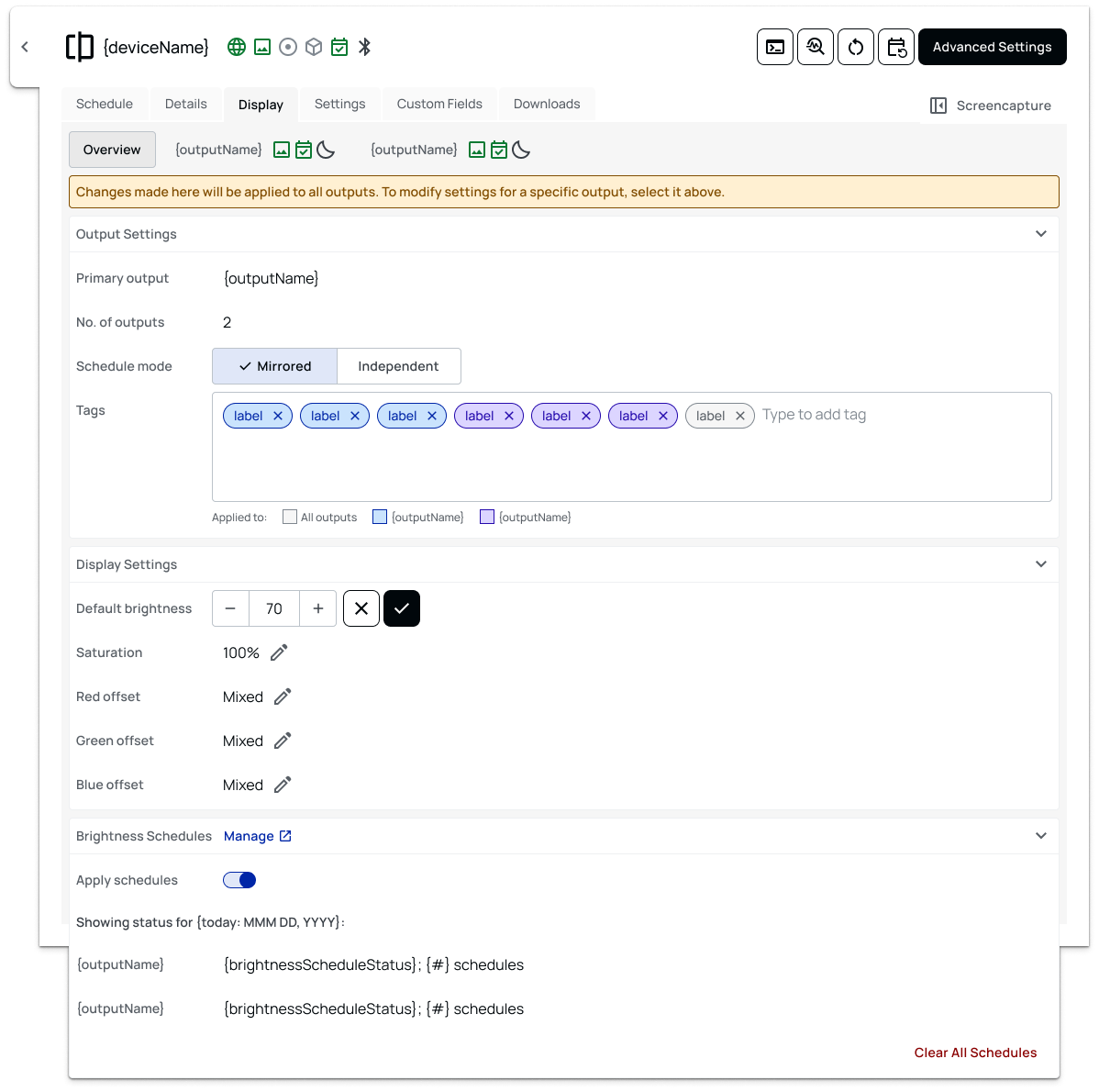
For settings like brightness, users needed the flexibility to configure each output differently without losing the convenience of managing the device as a whole. I designed the Overview level to apply appropriate changes across all outputs, while individual output views allowed more targeted control.
That same distinction shaped batch actions: some operations remained device-level, while others could target individual outputs.
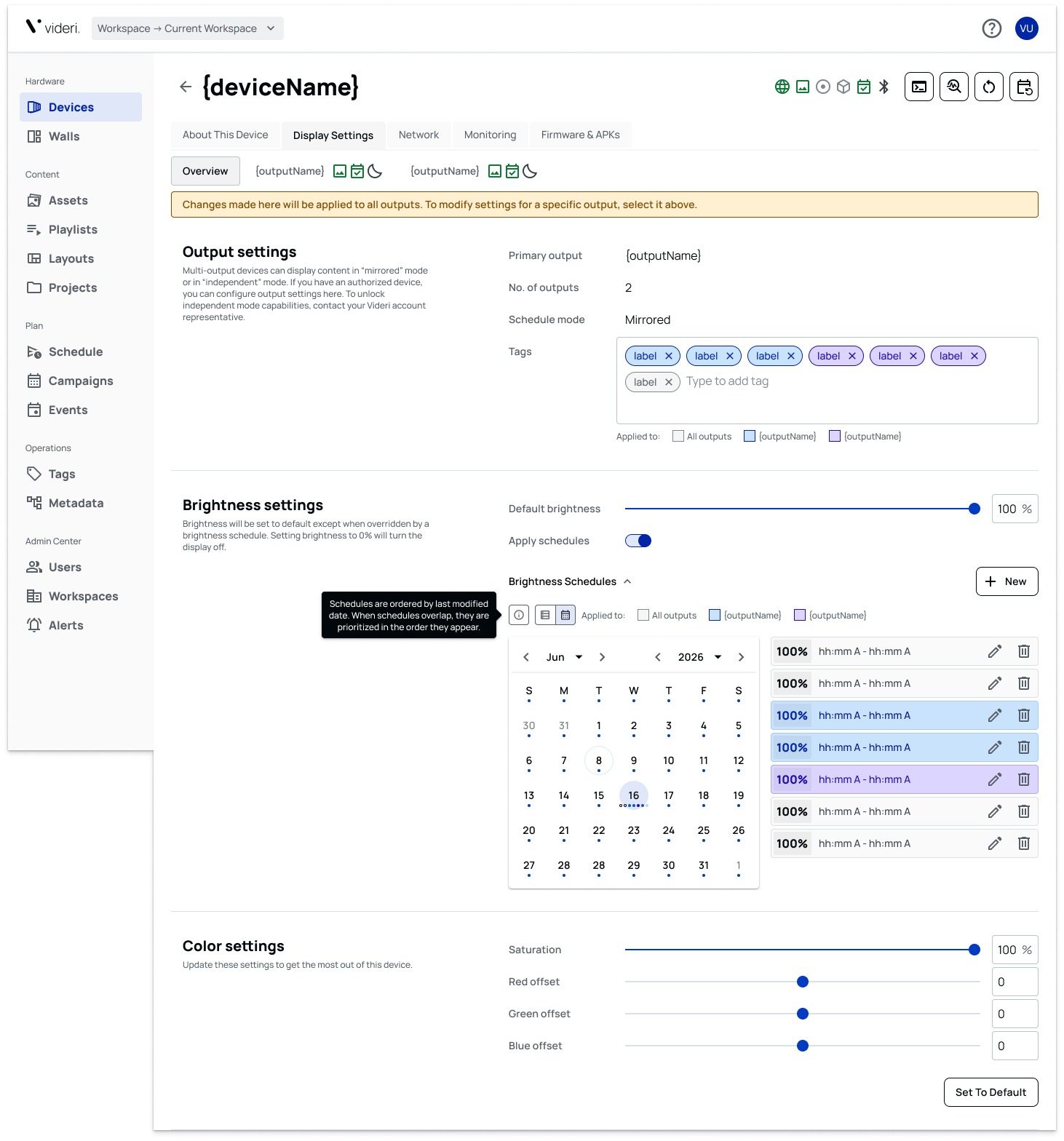
Brightness scheduling also exposed limitations in the existing workflow. Rather than bolt multi-output controls onto it, I made the case to redesign the experience for both single-output and multi-output devices—even though that work sat outside the original project scope.
The result was a workflow that supported the new hardware without making users trade efficiency for flexibility.
Designing for what came next
Some requirements solved immediate hardware needs. Others presented an opportunity to create better product infrastructure.
Product initially proposed tags at the device level. I pushed for output-level tagging instead.
That mattered because an individual output can represent a fundamentally different playback environment from another output on the same hardware. Treating tags as device metadata would have erased that distinction.
It also created a foundation for future smart scheduling capabilities, where content could eventually be targeted based on characteristics of individual playback surfaces rather than only the hardware they belong to.
I made a similar case for giving individual outputs names, allowing users to identify them as meaningful objects instead of anonymous ports.
These were small interface decisions with larger architectural consequences.
Expanding Portal3 without fragmenting the experience
Multi-output support expanded Portal3 beyond the assumption that one device must equal one playback surface.
The resulting architecture allowed dual-sided displays and multi-port SparkBridge devices to live inside the same management system as single-output commercial displays, while still supporting independent settings, metadata, proof-of-play, and control at the output level.
That gave Videri a foundation for supporting a broader range of hardware and deployment configurations without creating a parallel product experience.
More importantly, the work established a reusable model for how Portal3 represents complexity: preserve the familiar workflow at the surface, then reveal additional control only where the hardware and use case require it.