

Replacing the Content, Not the Work
Overview
A real-world controversy created an urgent problem for one of Videri’s customers: content featuring a spokesperson suddenly needed to come down.
In a digital signage network, replacing a piece of content isn’t always as simple as uploading a new file. The existing asset may already be scheduled across hundreds or thousands of devices, with metadata and configuration attached to it.
The existing workflow made that surprisingly expensive. Replacing the content meant creating a new asset—and potentially rebuilding schedules, metadata, and configuration that were still perfectly valid.
The product requirement introduced a more resilient model: let users replace an asset’s source file while preserving everything around it.
What I owned
I owned the interaction design for turning that product requirement into a safe, usable workflow across images, videos, and APKs. I worked through the technical constraints and edge cases for each asset type, defined how conflicts should be communicated, and designed the validation and warning states that helped users understand the consequences of a replacement without unnecessarily blocking them.
Role + Scope
Sr. Product Designer → Interaction design, workflow logic, technical edge cases, validation states, copy
The simple action wasn’t actually simple
Changing the source file could affect content that was already live throughout a signage network.
And each asset type introduced a different set of consequences:
Images could change resolution or orientation.
Videos could change resolution or duration, potentially affecting existing playback schedules.
APKs introduced package names and version-code requirements that could determine whether a replacement was compatible at all.
The challenge wasn’t simply enabling the swap. It was determining when the product should stop someone, when it should warn them, and when it should get out of their way.
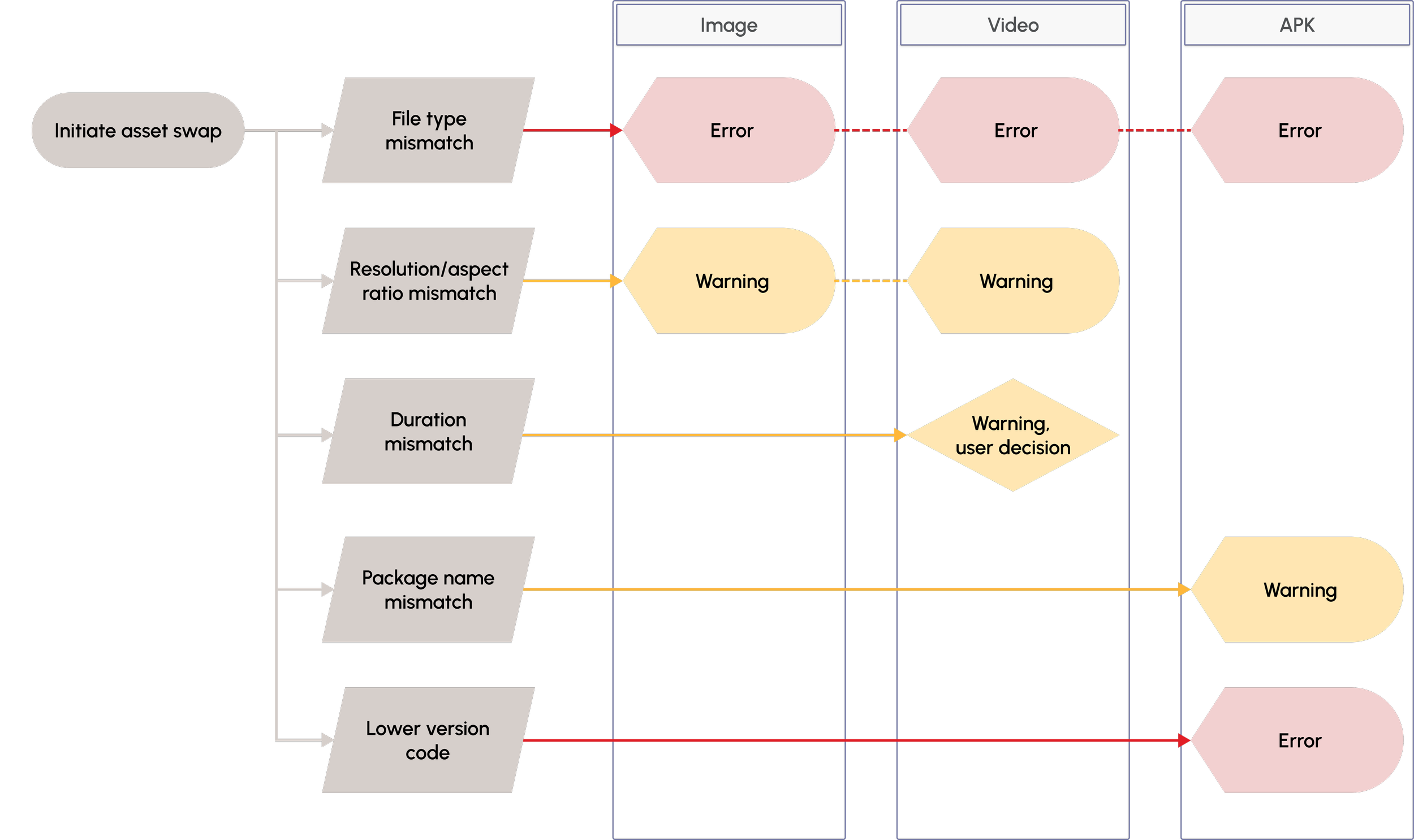
One action, different consequences: I mapped the replacement conditions across images, videos, and APKs to determine which mismatches should warn users and which should block the swap.
Designing guardrails, not gates
I worked with Engineering to understand the technical requirements and edge cases behind each asset type, then mapped the conditions the workflow needed to account for.
The safest approach would have been to block replacement whenever the incoming file differed from the original. But many differences weren’t inherently wrong. A user might intentionally swap in a video with a different duration or replace an outdated app version with a new one.
So I designed the workflow around the consequence of the change, rather than treating every discrepancy as an error.
When a difference could create an unexpected result, the interface warned the user and explained what would change. When a replacement was technically incompatible, the workflow prevented it.
Users kept control where the product could safely give it to them.
One workflow, different rules
The interaction needed to feel consistent even though the underlying validation varied considerably by file type.
Rather than creating three separate experiences, I used the same basic replacement pattern across images, videos, and APKs, changing the feedback according to the technical condition:
Image replacement
A resolution or orientation mismatch could change how the content appeared in the existing placement, so the user received a warning before proceeding.
Video replacement
Changes in duration or resolution could affect existing playback behavior. The workflow surfaced those consequences without automatically preventing the swap.
App replacement
Package and version constraints could make a replacement technically invalid. Those conditions required stronger validation and, when necessary, a hard stop.
This created a predictable interaction model for users while still respecting the very different rules operating underneath it.
The interaction stayed consistent; the guardrails changed with the consequence. Each replacement condition surfaced the level of intervention it actually required, whether that be in the form of an informational warning or a hard stop:

Image, file type mismatch
Blocked due to technical limitation: The replacement must match the original asset type.
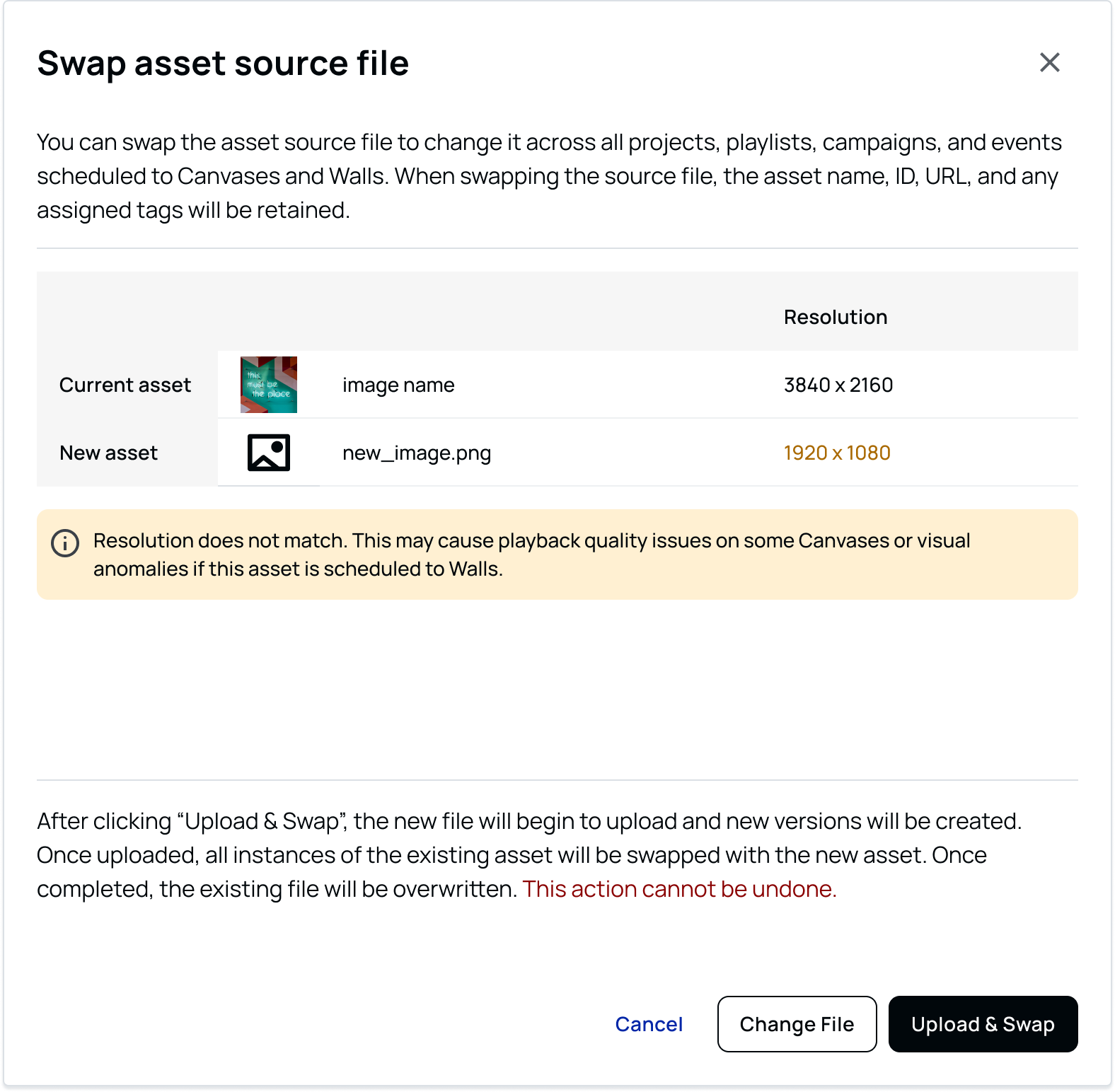
Image, resoluton mismatch
Warning: The swap can continue, but the new dimensions may affect how the content displays.
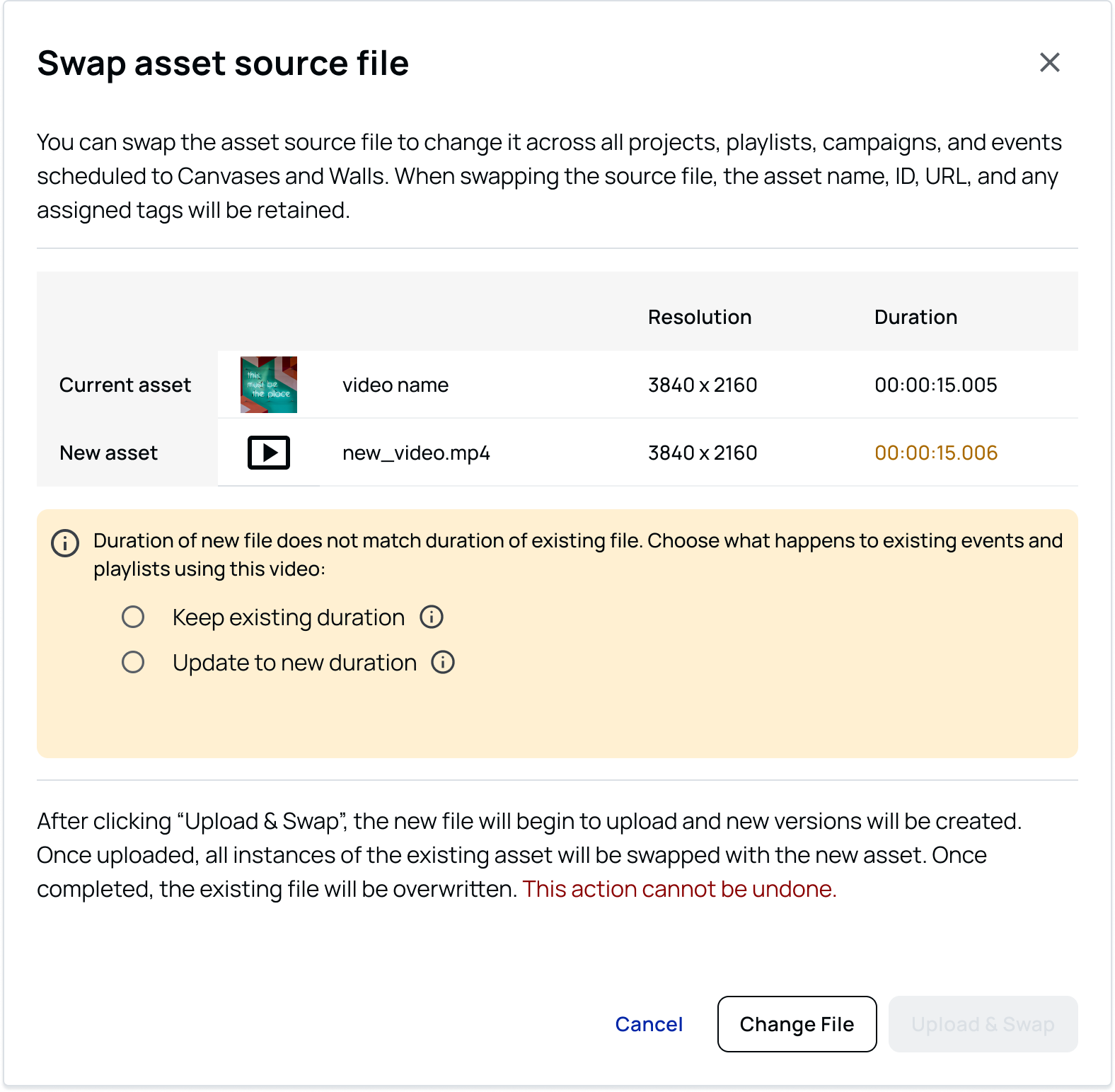
Video, duration mismatch
Warning with user decision: A different runtime may affect existing schedules, so the user chooses whether to continue.

APK, package name mismatch
Warning: A different package changes what’s being deployed, so the user is alerted before continuing.
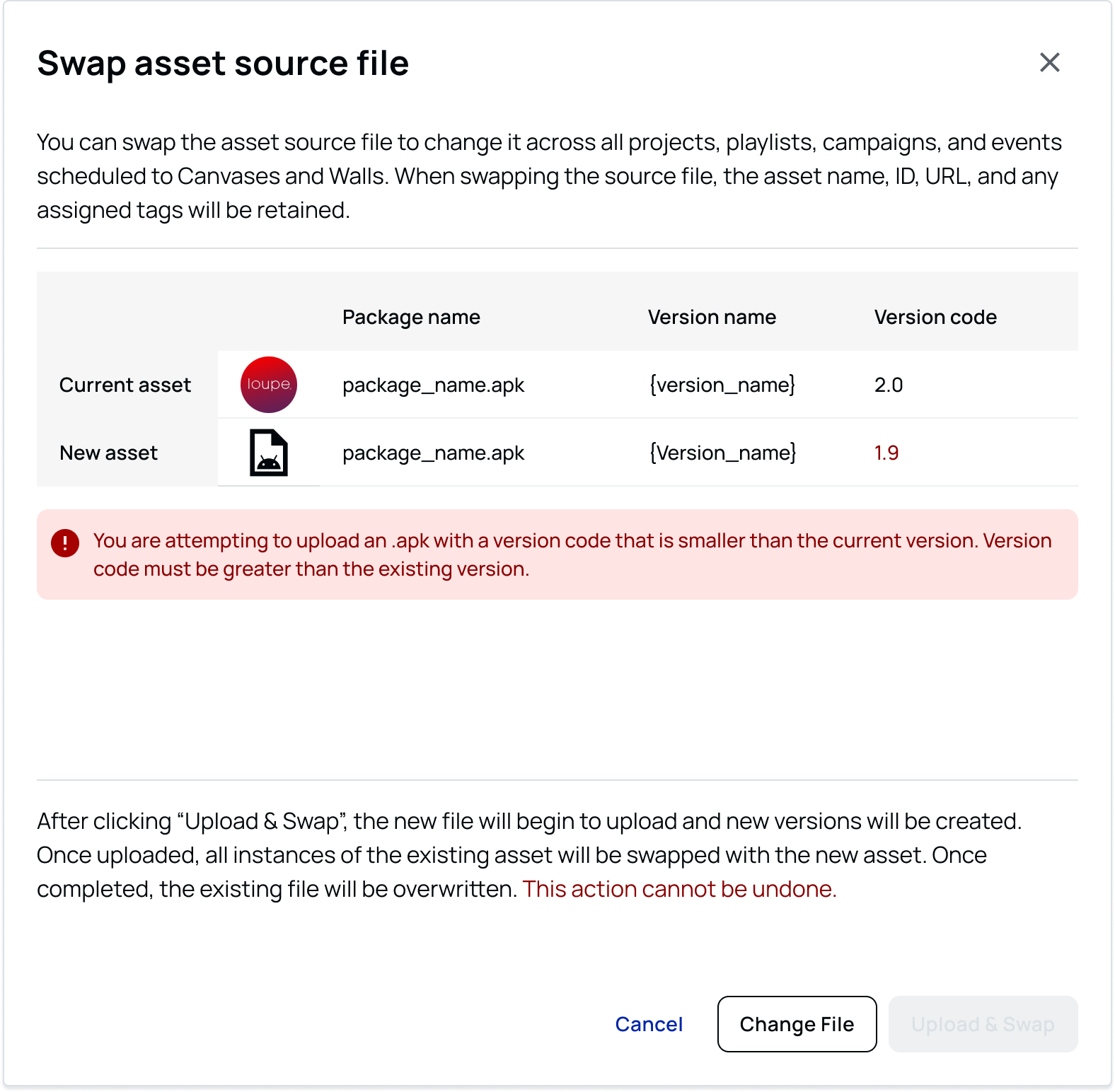
APK, lower version code
Blocked due to technical limitation: The replacement doesn’t meet the version requirements needed to complete the swap.
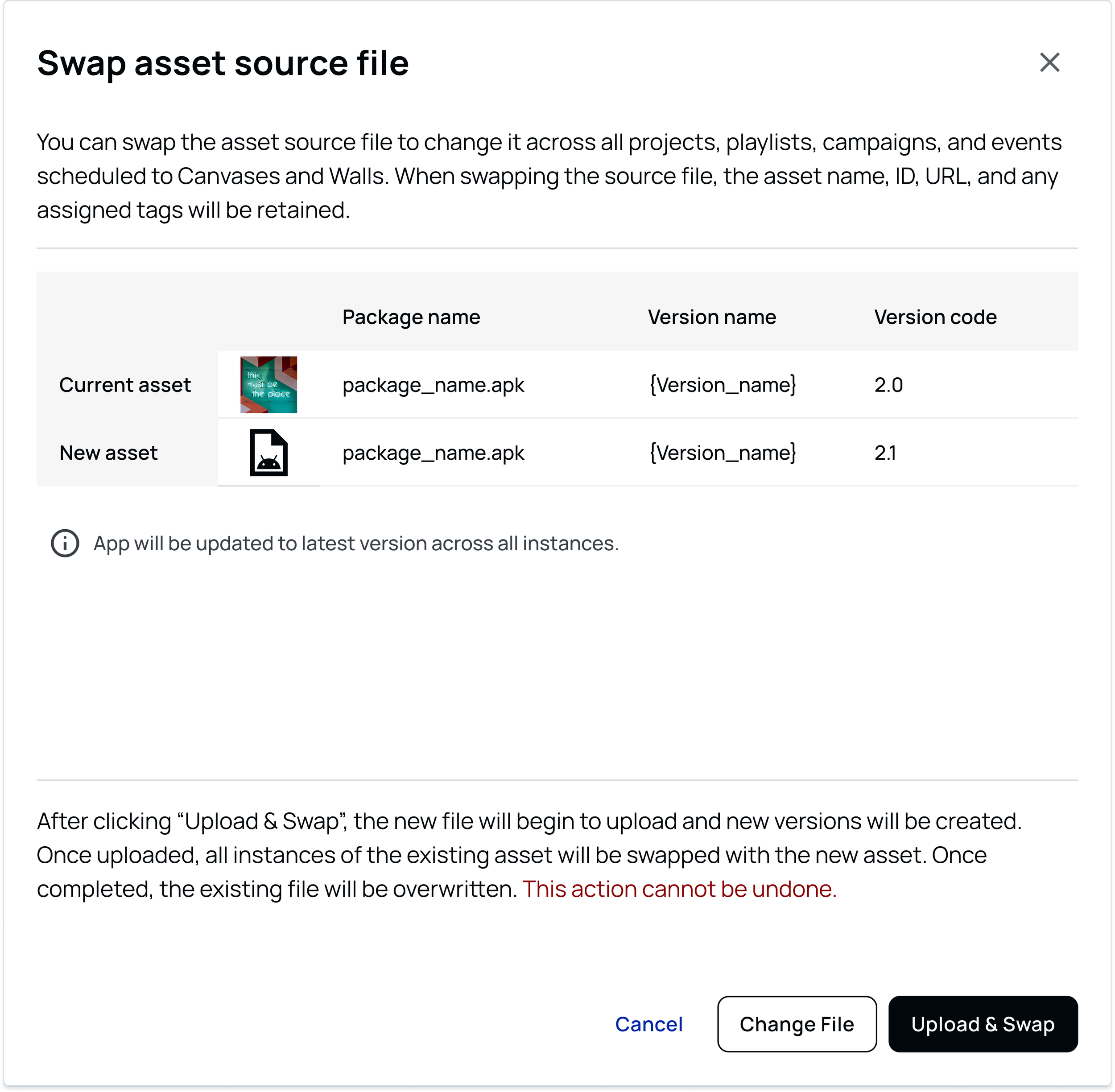
APK, higher version code
Success: A compatible package with a higher version code can replace the existing APK without additional intervention.
From rebuild to controlled update
The Asset Swap feature turned what had been a destructive recovery process into a focused update.
Users could replace problematic or outdated content while preserving the schedules, metadata, and other work already attached to the asset. Just as importantly, the workflow gave them clear guidance when a replacement could affect existing content—without unnecessarily restricting intentional changes.
The feature launched as part of the CMS and created a more resilient way to manage content when circumstances changed unexpectedly.
For me, the interesting part of the project wasn’t the swap itself. It was designing everything around that seemingly simple action: understanding where technical constraints mattered, translating them into understandable product behavior, and finding the right balance between protecting users and trusting their judgment.